
Quick Answer: For most PC builders in 2026, the ASUS TUF Gaming B650-Plus WiFi (~$150) is the best-value AM5 motherboard, the ASRock B650M Pro RS WiFi (~$120) is the cheapest good micro-ATX pick, and Intel builders should look at the (~$140). Match the socket to your CPU first — everything else comes second.
The motherboard is the backbone of every PC: it decides which CPU you can use, how much RAM you can install, how many SSDs fit, and whether your build gets Wi-Fi 6E, PCIe 5.0, or USB-C. Pick the wrong one and you are stuck — pick the right one and every future upgrade gets easier. This 2026 buying guide explains sockets, chipsets, DDR4 vs DDR5, and form factors in plain language, then lists the best motherboards to buy right now with prices in both PKR and USD and practical buying tips for Pakistan.
Contents
- What Does a Motherboard Actually Do?
- Socket & Chipset First: AMD AM5 vs Intel LGA1700
- DDR4 vs DDR5: Which Memory Should You Get?
- ATX vs Micro-ATX vs Mini-ITX: Picking a Form Factor
- Key Features That Actually Matter
- Best Motherboards to Buy in 2026 (with PKR + USD Prices)
- Buying Motherboards in Pakistan: Prices, Markets & Tips
- Common Mistakes to Avoid
- Frequently Asked Questions
- Final Verdict
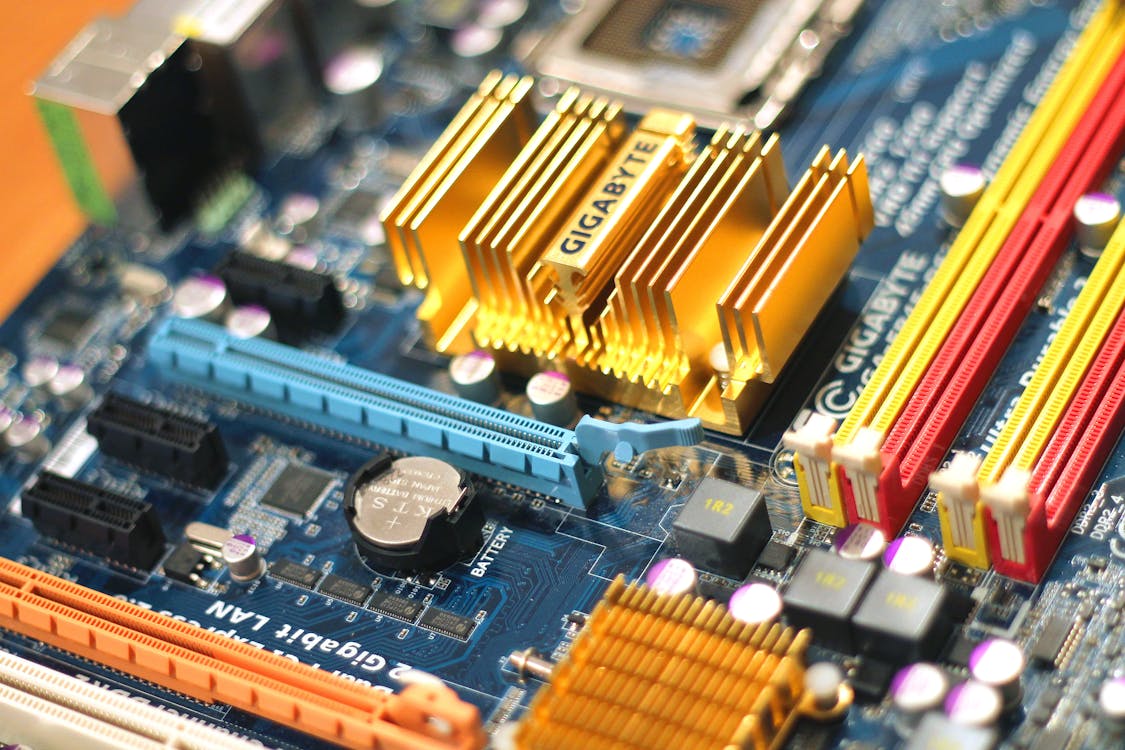
What Does a Motherboard Actually Do?
Every component in your PC plugs into the motherboard — the CPU sits in its socket, RAM clicks into its DIMM slots, the graphics card slides into a PCIe slot, and SSDs connect through M.2 slots or SATA ports. The motherboard's chipset manages communication between all of them. A good board gives you:
- CPU compatibility — the socket must physically match your processor (AM5 for current Ryzen, LGA1700 for 12th–14th gen Intel).
- Stable power delivery — the VRM (voltage regulator module) feeds clean power to your CPU; weak VRMs throttle fast chips.
- Expansion room — extra PCIe and M.2 slots decide whether you can add a second SSD or a Wi-Fi card later.
- Connectivity — USB ports, 2.5G Ethernet, Wi-Fi, Bluetooth, and audio all live on the board.
If you haven't chosen a CPU yet, read our Intel vs AMD in 2026 guide first — the processor decision locks in your socket, which locks in your motherboard shortlist.
Socket & Chipset First: AMD AM5 vs Intel LGA1700
In 2026, almost every new build uses one of two platforms:
- AMD AM5 — supports Ryzen 7000, 8000, and 9000 series CPUs. DDR5 only. AMD has promised long socket support, so an AM5 board bought today should accept future Ryzen chips too. Chipsets: A620 (budget, basic), B650/B650E (the sweet spot — overclocking support, PCIe 5.0 on E variants), X670/X870 (premium, more lanes and ports).
- Intel LGA1700 — supports 12th, 13th, and 14th gen Core CPUs. Available in both DDR4 and DDR5 versions — a rare chance to reuse old RAM. Chipsets: H610 (budget, limited), B760 (the sweet spot — memory overclocking, plenty of ports), Z790 (premium, full CPU overclocking).
Rule of thumb: buying a new CPU and RAM? Go AM5 + B650. Already own DDR4 RAM or a 12th/13th gen Intel chip? A B760 DDR4 board saves you real money.
DDR4 vs DDR5: Which Memory Should You Get?
- DDR5 — faster speeds (4800 MHz and up), better efficiency, and the only option on AM5. Prices have fallen enough that DDR5 makes sense for every new build in 2026.
- DDR4 — cheaper, and plenty fast for gaming and office work. Only worth choosing if you already own DDR4 sticks or you find a great B760 DDR4 bundle deal.
A motherboard supports either DDR4 or DDR5 — never both. The slots are physically different, so decide before you buy. Our RAM buying guide covers how much memory you actually need once you have picked a board.
ATX vs Micro-ATX vs Mini-ITX: Picking a Form Factor
- ATX — full size, most expansion slots, easiest to build on. Best for gaming rigs and workstations with room to grow.
- Micro-ATX — slightly smaller, usually 1–2 fewer PCIe slots, but often much cheaper. The value king for most builds — you keep the essentials and save $20–40.
- Mini-ITX — tiny, for compact cases. Only one PCIe slot and two RAM slots, and usually the priciest per feature. Only for small-form-factor builds.
Match the board size to your case: a Micro-ATX board fits in an ATX case, but an ATX board will not fit in a Micro-ATX case. When in doubt, Micro-ATX + a mid-tower case is the sweet spot.
Key Features That Actually Matter
- VRM quality — more power stages with heatsinks = a cooler, more stable CPU under load. Matters most for high-end chips; budget boards are fine for Ryzen 5 / Core i5 and below.
- M.2 slots — two slots minimum in 2026 (one for your boot SSD, one for future storage). Heatsinks on the slots keep NVMe drives from throttling. Our SSD vs HDD guide explains what to put in them.
- Built-in Wi-Fi — a WiFi board costs roughly $10–15 more than its non-WiFi twin and saves you buying a separate adapter. Worth it for most builders.
- BIOS Flashback — updates the BIOS without a CPU installed. A lifesaver if you buy an older board for a newer CPU.
- Rear I/O — count the USB ports (including USB-C), check for 2.5G Ethernet, and make sure the video outputs match your monitor if you use integrated graphics.

Best Motherboards to Buy in 2026 (with PKR + USD Prices)
Prices below were checked from Amazon and price trackers at drafting time and are marked approximate where they change daily. PKR figures use the current ~Rs 277 per USD bank rate as a guide — actual street prices in Pakistan vary with the dollar and import costs.
| Motherboard | Socket / Chipset | Form Factor | Approx. Price (USD) | Best For |
|---|---|---|---|---|
| ASRock B650M Pro RS WiFi | AM5 / B650 | Micro-ATX | ~$120 | Cheapest good AM5 board |
| Gigabyte B650M DS3H | AM5 / B650 | Micro-ATX | ~$140 | Budget AM5, no Wi-Fi needed |
| MSI PRO B760-P WiFi DDR4 | LGA1700 / B760 | ATX | ~$140 | Intel builders reusing DDR4 |
| ASUS TUF Gaming B650-Plus WiFi | AM5 / B650 | ATX | ~$150 | Best value AM5 all-rounder |
| MSI MAG B650 Tomahawk WiFi | AM5 / B650 | ATX | ~$160–180 | Mid-range gaming builds |
| ASUS ROG Strix B650E-F Gaming WiFi | AM5 / B650E | ATX | ~$290 | Premium PCIe 5.0 build |
1. ASRock B650M Pro RS WiFi — Best Budget AM5 Board
Approx. price: ~$120 (approx. Rs 33,200)
- Pros: cheapest reliable way onto AM5, built-in Wi-Fi, 2.5G LAN, solid feature set for the money.
- Cons: basic VRM — fine for Ryzen 5, not ideal for a Ryzen 9; Micro-ATX limits expansion.
The board to buy when every rupee counts but you still want the AM5 upgrade path.
2. Gigabyte B650M DS3H — Best Budget Pick Without Wi-Fi
Approx. price: ~$140 (approx. Rs 38,800)
- Pros: proven entry-level B650, 2.5G Ethernet, Q-Flash Plus BIOS update without CPU, good USB selection.
- Cons: no built-in Wi-Fi — add ~$15–20 for an adapter if you need wireless.
Pick this if your PC sits next to the router and you will never use Wi-Fi.
3. MSI PRO B760-P WiFi DDR4 — Best Intel Budget Board
Approx. price: ~$140 (approx. Rs 38,800)
- Pros: supports 12th–14th gen Intel, DDR4 version reuses your old RAM, Wi-Fi 6E, 2.5G LAN, full ATX size.
- Cons: DDR4 only on this variant — no DDR5 upgrade path on the same board; LGA1700 is a dead-end socket now.
The smart buy for upgrading an existing Intel system without replacing the RAM.
4. ASUS TUF Gaming B650-Plus WiFi — Best Value AM5 All-Rounder
Approx. price: ~$150 (approx. Rs 41,600)
- Pros: 12+2 power stages handle even a Ryzen 9, PCIe 5.0 M.2 slot, Wi-Fi 6, USB4 support, military-grade TUF durability testing.
- Cons: frequently sells out at deal prices; plain TUF styling is not for RGB lovers.
Our top recommendation for most builders — the board that does everything well at a fair price.
5. MSI MAG B650 Tomahawk WiFi — Best Mid-Range Gaming Board
Approx. price: ~$160–180 (approx. Rs 44,300–49,900)
- Pros: excellent VRM with big heatsinks, three M.2 slots, Wi-Fi 6E + Bluetooth 5.3, 2.5G LAN, premium audio codec.
- Cons: costs $20–30 more than the TUF for features most builders won't fully use.
For gaming rigs with a high-end GPU where the motherboard should never be the bottleneck.

6. ASUS ROG Strix B650E-F Gaming WiFi — Best Premium Pick
Approx. price: ~$290 (approx. Rs 80,300)
- Pros: PCIe 5.0 for both GPU and SSD, 12+2 power stages, three M.2 slots, Wi-Fi 6E, ROG styling and Aura Sync RGB.
- Cons: nearly double the price of a B650 board for gains most users will never feel; price fluctuates a lot.
Only for enthusiasts who want PCIe 5.0 everything and a board that looks as good as it performs.
Buying Motherboards in Pakistan: Prices, Markets & Tips
Motherboards are imported, so Pakistani street prices run 15–30% above US Amazon listings after shipping, customs, and dealer margins. Use the PKR figures above as ballpark expectations:
- Where to check: Hall Road Lahore, Techno City Karachi, and Hafeez Centre Lahore; online, check Daraz.pk, PakDukaan, and Galaxy.pk. Compare at least 3 sellers — motherboard prices vary wildly between shops.
- New vs used: used AM4/B550 boards are common and cheap on OLX, but for AM5 and LGA1700, buy new — BIOS version headaches on used boards are not worth the small saving.
- Check the box seal: genuine boards come factory-sealed with an intact anti-static bag and a driver DVD/USB. Refurbished boards sold as new are a known scam — inspect the CPU socket pins under light before paying.
- Warranty: ask whether it is official distributor warranty (brands like MSI, ASUS, Gigabyte have local distributors) or shop warranty. Official warranty costs more but covers dead boards properly.
- BIOS version: for AM5 boards paired with Ryzen 9000 CPUs, confirm with the seller that the BIOS supports your chip — or pick a board with BIOS Flashback so you can update it yourself.
- Bundles save money: Hall Road and Techno City shops often discount CPU + motherboard + RAM bundles by Rs 3,000–8,000 versus buying parts separately. Always ask for the bundle price.
Common Mistakes to Avoid
- Wrong socket: an AM5 CPU physically will not fit an AM4 or LGA1700 board. Double-check socket compatibility before ordering.
- Mixing DDR4 and DDR5: a DDR4 board cannot take DDR5 RAM and vice versa — the notches don't line up.
- Overspending on the board: a $300 motherboard does not make your PC faster than a $150 one with the same CPU and GPU. Put the difference into a better graphics card or SSD.
- Ignoring the case size: measure your case. An ATX board in a Micro-ATX case is an expensive paperweight.
- Forgetting BIOS updates: older-stock boards may need a BIOS update for newer CPUs — this is exactly what BIOS Flashback is for.
Frequently Asked Questions
Does the motherboard affect gaming performance?
Barely. With the same CPU, RAM, and GPU, a $120 board and a $300 board perform within 1–2% of each other. The motherboard matters for features, stability, and upgrade room — not frame rates.
Should I buy a DDR4 or DDR5 motherboard in 2026?
DDR5 for any new build — prices have normalized and all current AMD boards are DDR5-only. Choose DDR4 only if you already own DDR4 RAM and want to reuse it on an Intel B760 DDR4 board.
Is AM5 better than LGA1700 for a new PC?
For a brand-new build, yes — AM5 is the current platform with a longer upgrade path ahead, while LGA1700 is Intel's previous generation. LGA1700 still makes sense for budget upgrades reusing DDR4 RAM.
How much should I spend on a motherboard in Pakistan?
Budget roughly Rs 35,000–45,000 for a solid B650/B760 board, Rs 50,000–60,000 for a mid-range gaming board, and Rs 80,000+ for premium PCIe 5.0 boards at local market rates.
Do I need Wi-Fi on my motherboard?
If your PC is far from the router, yes — a built-in Wi-Fi board costs only slightly more than adding a separate adapter later, and it keeps a PCIe slot free.
Final Verdict
For most builders in 2026, the ASUS TUF Gaming B650-Plus WiFi is the sweet spot — strong VRMs, PCIe 5.0 storage, and Wi-Fi at a fair ~$150. Budget AM5 builders should grab the ASRock B650M Pro RS WiFi at ~$120, and Intel upgraders reusing DDR4 should pick the MSI PRO B760-P WiFi DDR4 at ~$140. Match the socket to your CPU, pick DDR5 for new builds, buy from a sealed box with official warranty in Pakistan, and your motherboard will serve you for years. Happy building!
Written by Admin
PENTIUM TECH HUB covers computers, laptops, and hardware — honest buying guides and comparisons with real prices for buyers in Pakistan and beyond.
Post a Comment